
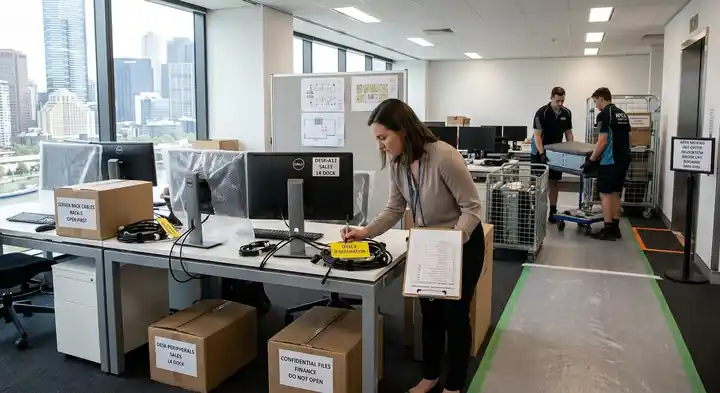
Moving the office is a major operational project. Between leases, staff, technology, furniture and building access, the businesses that experience the least disruption usually start planning early and assign clear ownership to every task.
This office relocation checklist is designed for Melbourne businesses planning a move to a new workplace. Use it as a practical timeline: work backwards from your handover date, confirm what must remain operational, and coordinate the people, systems and access requirements that affect moving day.
Start With a Relocation Plan
An office move is easier to manage when you treat it like any other project, with owners, deadlines and contingencies, rather than simply as a day when desks and boxes are transported.
Appoint a Relocation Coordinator
Choose one person to own the move. In a smaller business, this may be an office manager. In a larger organisation, it may be a facilities, operations or workplace manager. Their role should include:
- Maintaining the master relocation schedule
- Coordinating building managers, IT providers and removalists
- Communicating updates to staff
- Approving changes to the floor plan or moving sequence
- Managing issues on moving day
Confirm the Key Dates
Start with the date the new office must be operational, then work backwards. Allow enough time for lease obligations, fit-out completion, internet and phone provisioning, packing, access approvals and staff communication.
A practical planning window is often 8–12 weeks before the move, although the right timeframe depends on the size of the team, the amount of equipment, and whether the new office needs fit-out or technology work.
Define What Must Stay Operational
Before packing anything, identify the parts of the business that cannot stop functioning:
- Customer service and sales lines
- Email and cloud systems
- Payment systems
- Critical software and files
- Deliveries, dispatch or warehouse operations
- Client meetings and scheduled work
Decide what must remain available throughout the move, what can be offline briefly, and what can wait until the team is settled.
Prepare the New Office
The new site should be ready before staff and equipment arrive. A well-prepared destination reduces confusion, prevents delays and makes the first day far more productive.
Review the Floor Plan
Map out where teams, desks, storage, meeting rooms, printers, kitchen facilities and shared equipment will go. Check that the layout supports:
- Enough workstations for current staff
- Power and data points where they are needed
- Meeting-room capacity
- Accessible pathways and emergency exits
- Storage for files, equipment and supplies
- Space for future growth
Confirm Building Access
Melbourne office buildings often have specific requirements for moves, particularly in the CBD and larger commercial precincts. Contact both the current and new building managers early and confirm:
- Loading dock location and booking requirements
- Goods-lift availability and size limits
- Permitted moving hours
- Lift protection or floor-protection requirements
- Parking or loading-zone restrictions
- Security induction, contractor sign-in and access card arrangements
- Any documentation the building requires from contractors
Getting these details in writing helps prevent a move-day delay caused by an unbooked lift, restricted access or a missing approval.
Arrange Utilities and Connectivity Early
Internet, phone lines, security systems, alarms, printers and payment equipment can take longer to activate than businesses expect. Contact providers early to confirm:
- Internet activation dates
- Phone number porting or forwarding
- Network cabling and data-point requirements
- Alarm and access-control transfer
- Electricity, water and waste services
- Printer, EFTPOS and security-camera requirements
Where possible, have connectivity tested before the main moving day.
Communicate With Employees
Employees need clear instructions well before moving day. Good communication reduces duplicated work, protects important items and helps everyone understand what will happen.
Announce the Move Early
Tell staff the moving date, new address, reason for the relocation and what will change for them, and name a contact person for questions. Useful details to share include:
- The final day at the current office
- The first day at the new office
- New travel, parking and public transport information
- Any temporary remote-work arrangements
- Packing deadlines
- What staff should pack themselves
- What the business or removal team will handle
Give Staff a Workstation Checklist
Ask each employee to prepare their own workspace before the move:
- Back up files to approved business storage
- Remove personal belongings
- Clear desks and drawers
- Label cables, chargers and peripherals
- Secure confidential documents
- Return keys and shared equipment
- Follow the labelling system for boxes and furniture
Share the First-Day Plan
Before the move, tell staff what to expect on their first day: where to enter, where to sit, how to access the building, which systems should be working and who to contact if something is not ready.
Prepare IT, Equipment and Files
Technology is often the biggest source of relocation downtime, so plan the IT transition separately from the physical move.
Inventory Technology and Equipment
Create a list of what is moving, including:
- Computers, monitors, docks and peripherals
- Servers, network switches and Wi-Fi equipment
- Phones, headsets and conferencing systems
- Printers, scanners and shredders
- Televisions, projectors and meeting-room technology
- Safes, security equipment and access-control devices
- Specialised or high-value equipment
Record serial numbers, destination locations and any item that needs special handling.
Back Up Critical Data
Before equipment is disconnected, confirm that business data is backed up and accessible through an approved system. This is a sensible safeguard for any relocation, particularly where servers, local storage or specialist equipment are involved.
Label Cables and Equipment
Clear labelling saves considerable time during reconnection. Use a consistent system that identifies the item, the department or team, the destination floor or room, the workstation or desk, and any cable or connection details.
Photograph complex setups before disconnection, especially meeting-room systems, shared printers and workstation configurations.
Plan the IT Cutover
Agree in advance who will disconnect, transport and reconnect each type of equipment. Some businesses use their internal IT team; others involve an IT provider or the removal team, depending on the equipment and the agreed scope. Confirm:
- When systems will be shut down
- Which equipment moves first and which moves last
- Who reconnects computers, phones and network hardware
- How issues will be escalated
- The fallback plan if internet or phone services are delayed
Pack in a Logical Sequence
Packing should support the way the business needs to operate, not simply fill boxes as quickly as possible.
Pack Non-Essential Items First
Start with items that are not needed daily: archived files, spare stationery, decorative items, old marketing materials, surplus furniture, and equipment scheduled for disposal, donation or recycling. Keep everyday operational items accessible until closer to moving day.
Use a Clear Labelling System
Label every box with its destination floor, department or team, contents category, priority level and any handling instructions. For example: Level 3 – Finance – Stationery – Open First.
Protect Confidential Material
Keep sensitive files, keys, access cards, devices and important records secure. Decide who transports them, where they will be stored during the move, and who signs off on their arrival.
Coordinate Moving Day
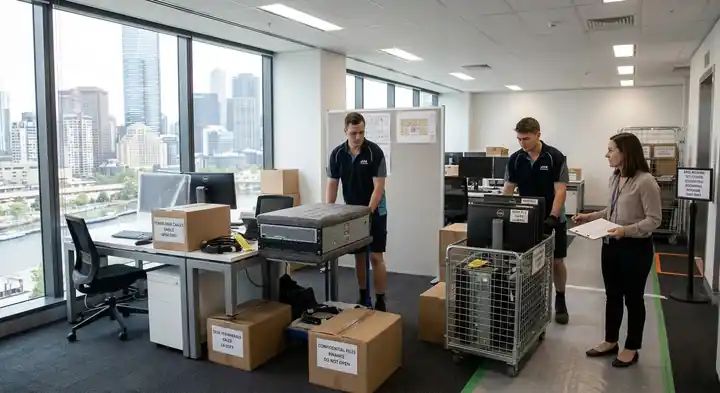
A clear run sheet keeps everyone aligned and reduces time lost waiting for decisions.
Confirm the Schedule
Before moving day, confirm the arrival time, parking and loading arrangements, lift bookings, the relocation coordinator’s contact details, the order of loading and unloading, which departments or floors move first, and who has authority to approve changes.
Protect Both Sites
Check that floors, walls, lifts and doorways are protected where required. This is particularly important in multi-tenant buildings, where damage or obstruction can affect other occupants.
Use a Move Sequence
For larger offices, consider moving in stages:
- Non-essential storage and archive materials
- Shared equipment and meeting-room items
- General furniture and workstations
- Critical IT equipment and operational items
The right sequence depends on the business, but the principle is simple: keep essential operations working for as long as possible.
Keep a Contingency Plan
Prepare for common disruptions such as delayed internet activation, lift or loading-dock access issues, furniture that does not fit the new layout, a key team member being unavailable, equipment that needs extra handling, and weather delays during loading or unloading.
Have a backup contact list, a decision-maker on site, and a plan for staff to work remotely or from an alternative location if needed.
Set Up and Test the New Office
The move is not finished when the last box arrives. The first day should include a structured check of the new workplace.
Complete a First-Day Walkthrough
Check entry, access cards and security; power and lighting; internet and phone systems; printers and shared devices; meeting-room technology; kitchen and amenities; workstations and chairs; emergency exits and safety information; and signage and reception details.
Test Critical Systems
Confirm that email, internet, phones, payment systems and key business software are working before the wider team relies on them.
Resolve Issues Quickly
Assign someone to log issues, prioritise fixes and communicate updates. Minor problems are normal after a move; leaving them unresolved is what affects productivity.
Review the First Week
After the first few days, review how the new office is working:
- Can teams work efficiently in the new layout?
- Are there enough meeting rooms, storage areas and power points?
- Are there recurring IT, access or facilities issues?
- Does anything need to be rearranged, returned or replaced?
- Are there outstanding tasks at the previous office?
Finalise the handback requirements for the old premises, including removing remaining items, arranging cleaning if required, and returning keys, access cards or security equipment.
Office Relocation Checklist
8–12 Weeks Before the Move
| Task | Owner |
|---|---|
| Appoint a relocation coordinator | Management |
| Confirm the move date and key lease dates | Management / relocation coordinator |
| Identify systems and operations that must stay running | Management / IT team |
| Contact both building managers about access rules | Relocation coordinator |
| Book internet, phone and network cabling at the new site | IT team / provider |
| Announce the move to staff | HR / management |
| Request quotes and confirm the removal team | Relocation coordinator |
4–8 Weeks Before the Move
| Task | Owner |
|---|---|
| Finalise the floor plan and seating | Relocation coordinator |
| Plan the IT cutover and equipment inventory | IT team / provider |
| Order packing materials and labels | Office manager |
| Start packing non-essential items | All departments |
| Share the labelling and packing guide with staff | HR / office manager |
| Confirm loading dock, lift and access requirements in writing | Relocation coordinator |
| Arrange disposal, recycling or donation of unwanted items | Operations |
| Plan storage and handling of valuable and confidential items | Finance / operations |
1–2 Weeks Before the Move
| Task | Owner |
|---|---|
| Confirm the moving-day schedule | Relocation coordinator |
| Share final instructions with employees | HR / management |
| Label boxes, furniture and cables | All departments |
| Back up critical data | IT team |
| Confirm removal arrangements and access details | Relocation coordinator |
| Prepare a contingency plan | Relocation coordinator |
| Pack low-priority workstations and shared areas | All departments |
Moving Day
| Task | Owner |
|---|---|
| Confirm building access and lift bookings | Relocation coordinator |
| Protect floors, walls and doorways where required | Removal team / building management |
| Follow the agreed loading and unloading sequence | Removal team / relocation coordinator |
| Keep critical systems operational where possible | IT team |
| Keep a decision-maker available on site | Management |
| Check items against the inventory as they arrive | Operations / admin |
First Day and First Week
| Task | Owner |
|---|---|
| Test internet, phones, power and access systems | IT / facilities |
| Check meeting rooms, printers and shared equipment | IT / office manager |
| Help staff settle into their workstations | Team leaders |
| Log and resolve outstanding issues | Relocation coordinator |
| Review the layout and workflow | Management |
| Complete handback requirements at the old office | Relocation coordinator |
When to Involve Professional Office Removalists
Once the business has a clear plan, a professional removal team can help manage the physical relocation: transporting furniture and equipment, coordinating the moving sequence, and handling the logistics of getting items safely from one site to another.
For Melbourne businesses that want support with the physical move, Apex Moving provides office removal and relocation services, including furniture transport and moving-day planning. Explore Apex Moving’s office removalists in Melbourne to discuss the logistics of your relocation.
Frequently Asked Questions
How far in advance should a business plan an office move?
Many businesses benefit from starting 8–12 weeks before the move, especially if the new office needs fit-out, cabling, internet activation or building approvals. Larger teams or more complex relocations may need longer.
What should employees do before an office move?
Employees should back up files to approved storage, remove personal belongings, clear their workstations, label cables, and follow the business’s packing and confidentiality instructions.
How can a business reduce downtime during an office relocation?
Plan the move around critical operations, keep essential systems running where possible, move non-essential items first, prepare IT and connectivity early, and use a clear moving-day sequence.
What access arrangements are needed for an office move?
Confirm loading-dock bookings, goods-lift availability, permitted moving hours, parking or loading-zone rules, security requirements, and any lift or floor-protection requirements with both building managers.
What should be checked on the first day in a new office?
Check access, power, internet, phones, printers, meeting-room technology, workstations, kitchen facilities, emergency exits and any critical business systems.